
Vampire Transformation
Give your portrait a gothic vampire look with mist, crimson lighting, and bats.
Turn your favorite photos into spooky, shareable Halloween videos. Upload a photo, choose a Halloween effect, and let AI bring the magic to life.
Create My Halloween VideoLoading credit cost…
Choose a photo and effect to get started.
Give your portrait a gothic vampire look with mist, crimson lighting, and bats.
Add a witch-inspired look with magical sparkles and glowing pumpkins.
Bring your pet photo to life in a cozy Halloween scene.
Upload a clear portrait or pet photo to turn it into an AI Halloween video. Choose a JPG or PNG image up to 10 MB.
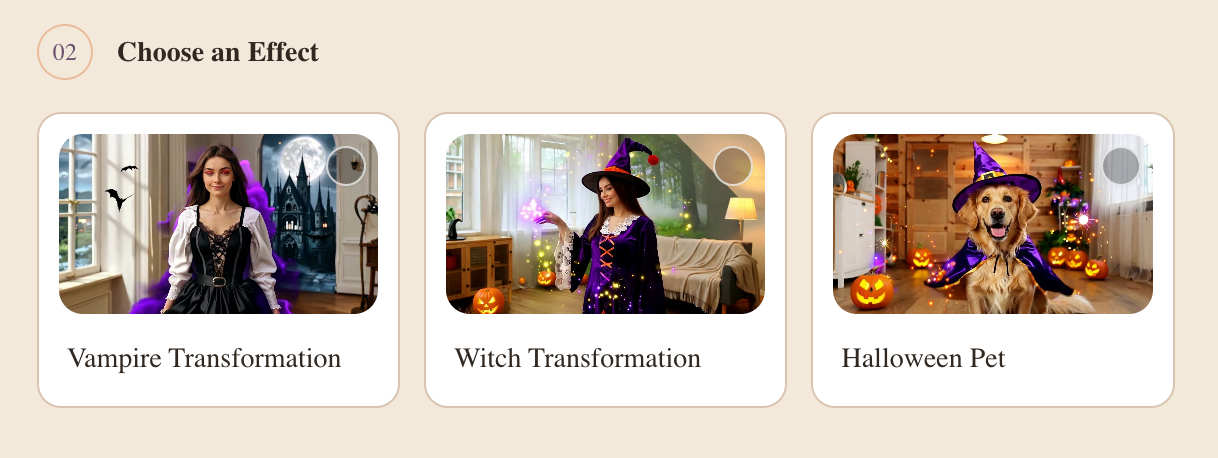
Select Vampire Transformation, Witch Transformation, or Halloween Pet. Preview the example video to find the Halloween effect you like.
Generate your Halloween video from the photo, then preview and download the result to share on TikTok, Instagram, or with friends.
Create a spooky video with Vampire Transformation, Witch Transformation, or Halloween Pet. Choose a preset effect without writing prompts or using video editing software.
Preview your AI Halloween video, download the result, and share it on TikTok, Instagram, or with friends. Keep the finished video for your seasonal posts and Halloween messages.
Turn a clear portrait or pet photo into a Halloween-themed video. Choose a transformation for yourself or try the Halloween Pet effect for your companion.
An AI Halloween video generator turns a portrait or pet photo into a Halloween-themed video. VidSparkle offers Vampire Transformation, Witch Transformation, and Halloween Pet effects, so you can create a spooky video without writing prompts or using video editing software.
Upload a clear JPG or PNG photo, choose a Halloween effect, and preview its example video. Sign in, check the displayed credit cost, and generate your video. When it is ready, preview and download the result.
Yes. Upload a clear photo of your pet and select the Halloween Pet effect. You can preview the example before generating, then download your pet’s Halloween video when it is ready.
You can download your generated Halloween video and upload it to TikTok, Instagram, or other social platforms. Sharing is subject to the site’s usage terms, the platform’s rules, and any third-party rights in your photo or video.
Video generation uses credits. The generator displays the current credit cost before you start. Sign in to check your available credits and make sure you have enough for the selected generation.
Generation time varies with service demand. After you submit your photo and effect, the preview area shows the upload, queue, and generation status. You can preview and download the video once it is ready.
AI Halloween effects can change facial features, clothing, and other details, so an exact likeness is not guaranteed. Start with a clear, well-lit portrait where your face is easy to see, and review the generated video before sharing it.
Upload a valid JPG or PNG image up to 10 MB. Use a clear portrait for Vampire Transformation or Witch Transformation, or a pet photo for Halloween Pet. Only upload images you own or have permission to use.
Turn your portrait or pet photo into a Halloween video with ready-to-use AI effects. Choose your transformation, preview the result, and download a video to share.